Wayfinding on Large-Format Touchscreens

A convienant way for shoppers to get directions and access venue information with a few taps.

Tasks

UI / UX Design, Product Strategy, User Testing, Prototyping, Stakeholder Co-Design Sessions

Date

2019-2022

Results

Achieved 80% adoption of our directory in the 6 months; used by millions of shoppers every month; introduced new reveneue stream with Directory Ads

Context

Mappedin’s Digital Directory is a touchscreen-based wayfinding tool used in thousands of malls worldwide, including major destinations like the Toronto Eaton Centre. We needed to deliver a new product version that provided more intuitive navigation and venue information. It needed to work across a range of hardware setups where they could vary in screen size, mounting height, and resolution.

Problem Areas

As our mapping platform grew more sophisticated, the Digital Directory needed to evolve beyond its initial use case as a searchable directory.
Search was the primary focus; the map was secondary. As a result, directions weren’t always clear or intuitive.

Search was the primary focus; the map was secondary. As a result, directions weren’t always clear or intuitive.

Users couldn’t orient themselves within the venue or explore nearby locations effectively due to limited map interactivity.

Users couldn’t orient themselves within the venue or explore nearby locations effectively due to limited map interactivity.

There was no support for multi-floor navigation. Users had to manually switch floors to follow directions.

There was no support for multi-floor navigation. Users had to manually switch floors to follow directions.

Venue owners lacked ways to engage visitors beyond search and directions.

Venue owners lacked ways to engage visitors beyond search and directions.

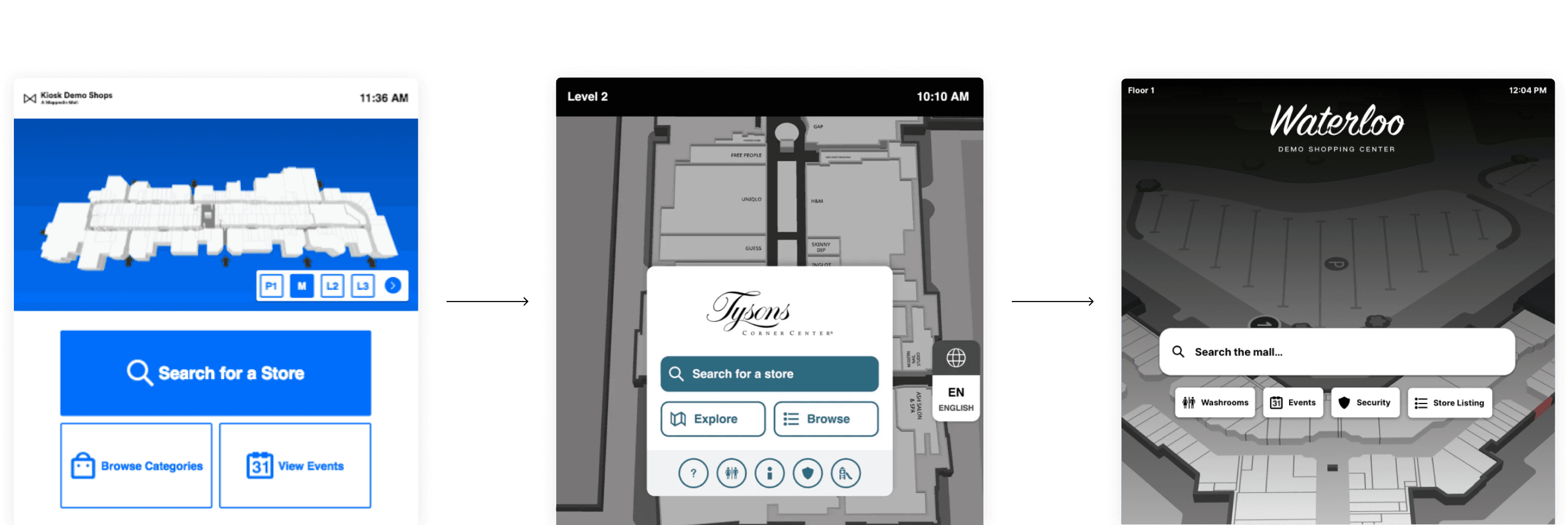
Moving towards a map-centric interface; OLD interface (left), NEW homescreen iterations (middle and right)
Key Considerations

The interface needed to be easy to understand and navigate, even for first-time users. This interface would be infrequently used, with some users using a large touch-screen device for the first time.

The interface needed to be easy to understand and navigate, even for first-time users. This interface would be infrequently used, with some users using a large touch-screen device for the first time.

Adhering to accessibility standards (like ADA) was crucial to ensure inclusivity.

Adhering to accessibility standards (like ADA) was crucial to ensure inclusivity.

The solution needed to both align with the SDK and push the boundaries in other areas. We needed to support 3D map rendering and work the structure of our location data throughout the interface.

The solution needed to both align with the SDK and push the boundaries in other areas. We needed to support 3D map rendering and work the structure of our location data throughout the interface.

The directory should offer features that not only benefit end-users but also provide value to venue operators, such as advertising opportunities, analytics on user behavior, and branding.

The directory should offer features that not only benefit end-users but also provide value to venue operators, such as advertising opportunities, analytics on user behavior, and branding.

Design Process

Discovery & Definition

We worked closely with both venue operators and end-users to understand their needs. This included co-design sessions with a marquee client to help define core functionality.

Exploration & Ideation

We reviewed accessibility standards, evaluated feedback on the existing product, and explored multiple UI approaches.

Design & Prototyping

We built out key flows including search, directions, and location selection, and created prototypes for in-office testing on actual hardware.

Refinement & Release

We collaborated with developers to refine the product and deployed updates based on in-venue testing and real-world feedback.

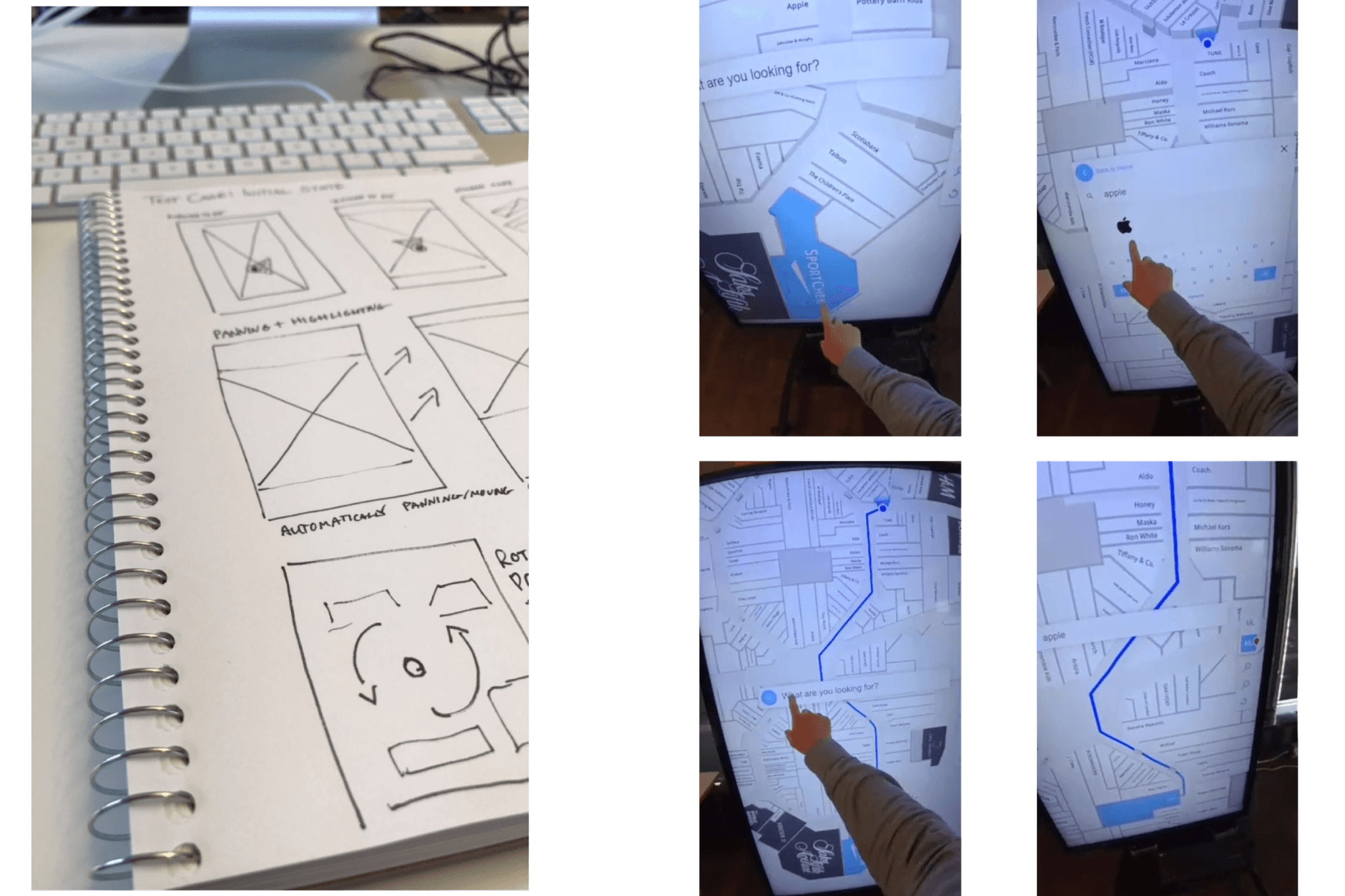
Conceptulizing various test cases (left); Running in-person user testing (right)

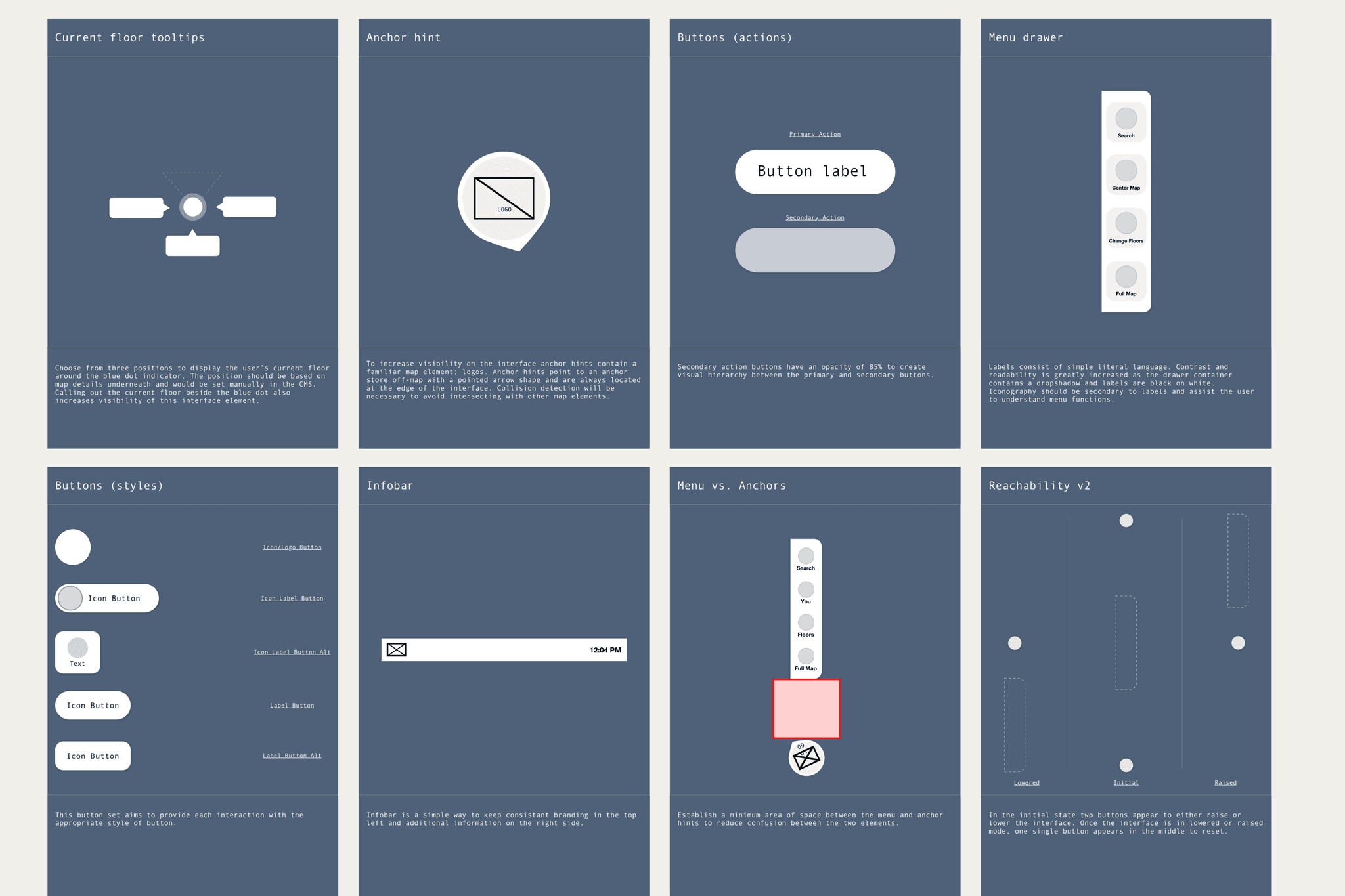
Wireframes experiementing with a contextual menu (left); Coded prototype for early user tests (right)

Lo-fi component experiementation

Visual tests were conducted to experiment with different stylistic directions and UI elements

Design Process

Discovery & Definition

We worked closely with both venue operators and end-users to understand their needs. This included co-design sessions with a marquee client to help define core functionality.

Exploration & Ideation

We reviewed accessibility standards, evaluated feedback on the existing product, and explored multiple UI approaches.

Design & Prototyping

We built out key flows including search, directions, and location selection, and created prototypes for in-office testing on actual hardware.

Refinement & Release

We collaborated with developers to refine the product and deployed updates based on in-venue testing and real-world feedback.

Conceptulizing various test cases (left); Running in-person user testing (right)

Wireframes experiementing with a contextual menu (left); Coded prototype for early user tests (right)

Lo-fi component experiementation

Visual tests were conducted to experiment with different stylistic directions and UI elements

Challenges

We needed to build a directory that helped users get to their destination quickly and confidently.

Icons and interactive elements lacked clear visual cues. Users struggled to understand what they could tap or interact with. We needed to make it feel familiar and immediately intuitive.

Icons and interactive elements lacked clear visual cues. Users struggled to understand what they could tap or interact with. We needed to make it feel familiar and immediately intuitive.

Key features were underutilized, such as tapping for a context menu or understanding anchor labels. because they weren’t clearly communicated. We needed to be more direct with the available actions a user could take and not assume they would discover them.

Key features were underutilized, such as tapping for a context menu or understanding anchor labels. because they weren’t clearly communicated. We needed to be more direct with the available actions a user could take and not assume they would discover them.

Users expected the map to automatically orient itself in their direction of travel, similar to outdoor navigation apps. We needed to quickly provide users where they are in a venue, what direction they are facing, and what floor they are on.

Users expected the map to automatically orient itself in their direction of travel, similar to outdoor navigation apps. We needed to quickly provide users where they are in a venue, what direction they are facing, and what floor they are on.

Users would see complex directions across multiple floors and get confused. It was important to provide users with a simple mental model of the directions they could remember as they walked away.

Users would see complex directions across multiple floors and get confused. It was important to provide users with a simple mental model of the directions they could remember as they walked away.

Solutions

We addressed the usability, orientation, and engagement issues by redesigning the interface with the map at the core of the experience, improving accessibility, and introducing features that balanced end-user and customer needs.

The map was made central to the experience, with fullscreen map views for directions, location selection, and venue exploration. We stopped short of building everything around the map to provide focused states for features such as search, events, and category browsing. At all times, the map was a tap away.

The map was made central to the experience, with fullscreen map views for directions, location selection, and venue exploration. We stopped short of building everything around the map to provide focused states for features such as search, events, and category browsing. At all times, the map was a tap away.

We researched user height and touch zones to design for visibility and reach, allowing us to accommodate all users. An accessibility button lowered the interface as needed. Directional preferences (e.g., ramps or elevators) could also be toggled.

We researched user height and touch zones to design for visibility and reach, allowing us to accommodate all users. An accessibility button lowered the interface as needed. Directional preferences (e.g., ramps or elevators) could also be toggled.

We optimized for infrequent use by applying familiar design patterns, while continually testing for large-screen ergonomics: font sizes, touch targets, state flows and information density were refined iteratively.

We optimized for infrequent use by applying familiar design patterns, while continually testing for large-screen ergonomics: font sizes, touch targets, state flows and information density were refined iteratively.

We integrated advertising space in a way that didn’t detract from usability, aligning with the digital out-of-home (DOOH) strategies already familiar to venue operators. Venue operators could also showcase on-going events with a dedicated section in the app.

We integrated advertising space in a way that didn’t detract from usability, aligning with the digital out-of-home (DOOH) strategies already familiar to venue operators. Venue operators could also showcase on-going events with a dedicated section in the app.

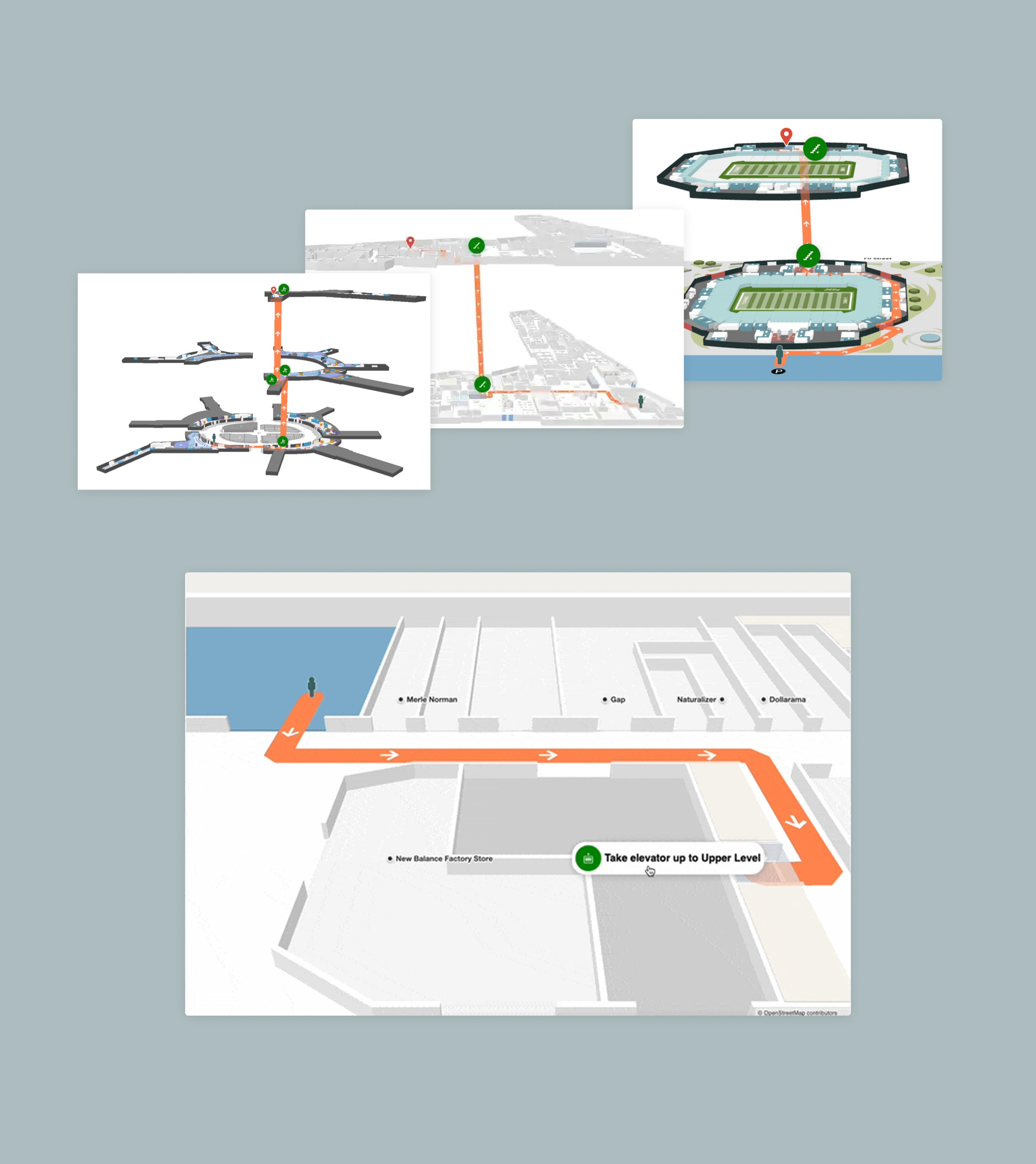
We added support for stacked maps in our SDK, allowing users to see the entire multi-floor journey in a single view. When viewing a single floor, the app automatically oriented the map to the user’s position and direction, with the correct zoom level and transition.

We added support for stacked maps in our SDK, allowing users to see the entire multi-floor journey in a single view. When viewing a single floor, the app automatically oriented the map to the user’s position and direction, with the correct zoom level and transition.

Final Notes

Designing for large-format touch screens introduced unique challenges around discoverability, accessibility, and spatial awareness. Balancing user experience with venue business needs, such as ad revenue, was a key focus. Over time, the directory was successfully deployed to thousands of venues.

Later, I transitioned into a Product Management role, where I collaborated with a new product designer to refresh the UI and continue refining the experience. I also helped launch features like voice control, Broadsign ad integration, and smart search powered by machine learning.

Building digital things since 09'

© 2025

Building digital things since 09'

© 2025