Wayfinding on the Web

A familiar and flexible way to explore venues and find your way from any device
Tasks

Product Design, Product Strategy, User Research, Prototyping

Date

2018-2022

Results

75% of directory customers adopted Mappedin Web in its first year; a real-time positioning feature we designed led to a 42% increase in location selections, 2x lift in direction lookups and introduced a new revenue stream for our business

Context

Mappedin Web is an embeddable, responsive wayfinding product used by malls, stadiums, and other large venues. Users can access a dynamic indoor map on any device simply by visiting a venue's website. Our goal was to make the experience feel familiar, accurate, and valuable, whether planning a visit from home or navigating on-site.

Problem Areas

Mappedin’s existing web solution struggled from slow custom deployments, low user engagement, limited user insights, and outdated indoor navigation.
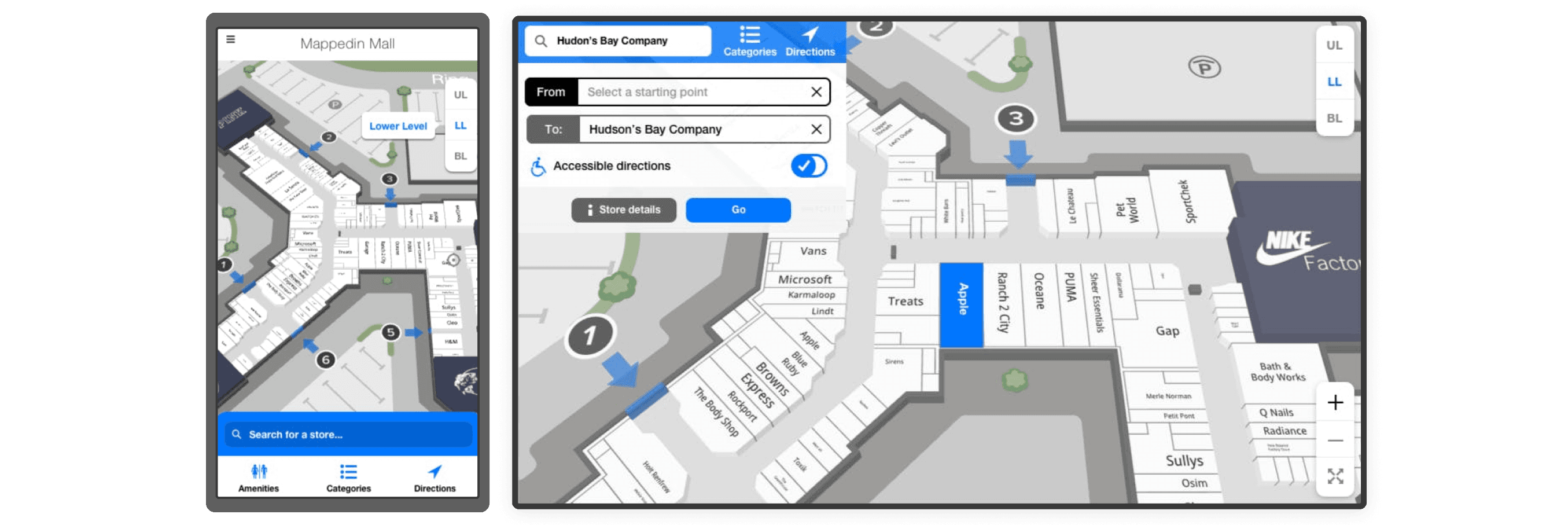
Customers wanted a plug-and-play indoor map they could easily embed on their websites. At the time, each deployment was built as a custom solution which was costly to maintain and slow to scale.

Customers wanted a plug-and-play indoor map they could easily embed on their websites. At the time, each deployment was built as a custom solution which was costly to maintain and slow to scale.

Shopping centres and other venues were seeing strong website traffic but lacked tools to turn that attention into action. Visitors could browse stores, but not easily find their way once on-site.

Shopping centres and other venues were seeing strong website traffic but lacked tools to turn that attention into action. Visitors could browse stores, but not easily find their way once on-site.

Search and navigation data was trapped in native apps like Apple Maps or Google Maps. Venue operators couldn’t access insights on what users searched for or how they moved through their spaces.

Search and navigation data was trapped in native apps like Apple Maps or Google Maps. Venue operators couldn’t access insights on what users searched for or how they moved through their spaces.

There was no existing mobile-friendly product built specifically for indoor navigation. Users were accustomed to outdoor wayfinding apps with real-time positioning, but those expectations weren’t yet being met indoors.

There was no existing mobile-friendly product built specifically for indoor navigation. Users were accustomed to outdoor wayfinding apps with real-time positioning, but those expectations weren’t yet being met indoors.

Key Considerations

The product needed a scalable SaaS solution, easy to onboard and deploy, with minimal touch points required by either side.

The product needed a scalable SaaS solution, easy to onboard and deploy, with minimal touch points required by either side.

The map had to remain central. Every UI element needed to support navigation, not distract from it.

The map had to remain central. Every UI element needed to support navigation, not distract from it.

The product had to be highly customizable, so each installation could match the customer’s brand while retaining a consistent user experience.

The product had to be highly customizable, so each installation could match the customer’s brand while retaining a consistent user experience.

Design Process

Discovery & Definition

We gathered feedback from venue operators and reviewed pain points in our existing custom builds. We also benchmarked common patterns in consumer-facing navigation products to understand user expectations.

Exploration & Ideation

We defined key user journeys; planning ahead vs. navigating in-venue, and structured the product around both. Internally, we rallied around a map-first approach: a balance of UI and context using the map.

Design & Prototyping

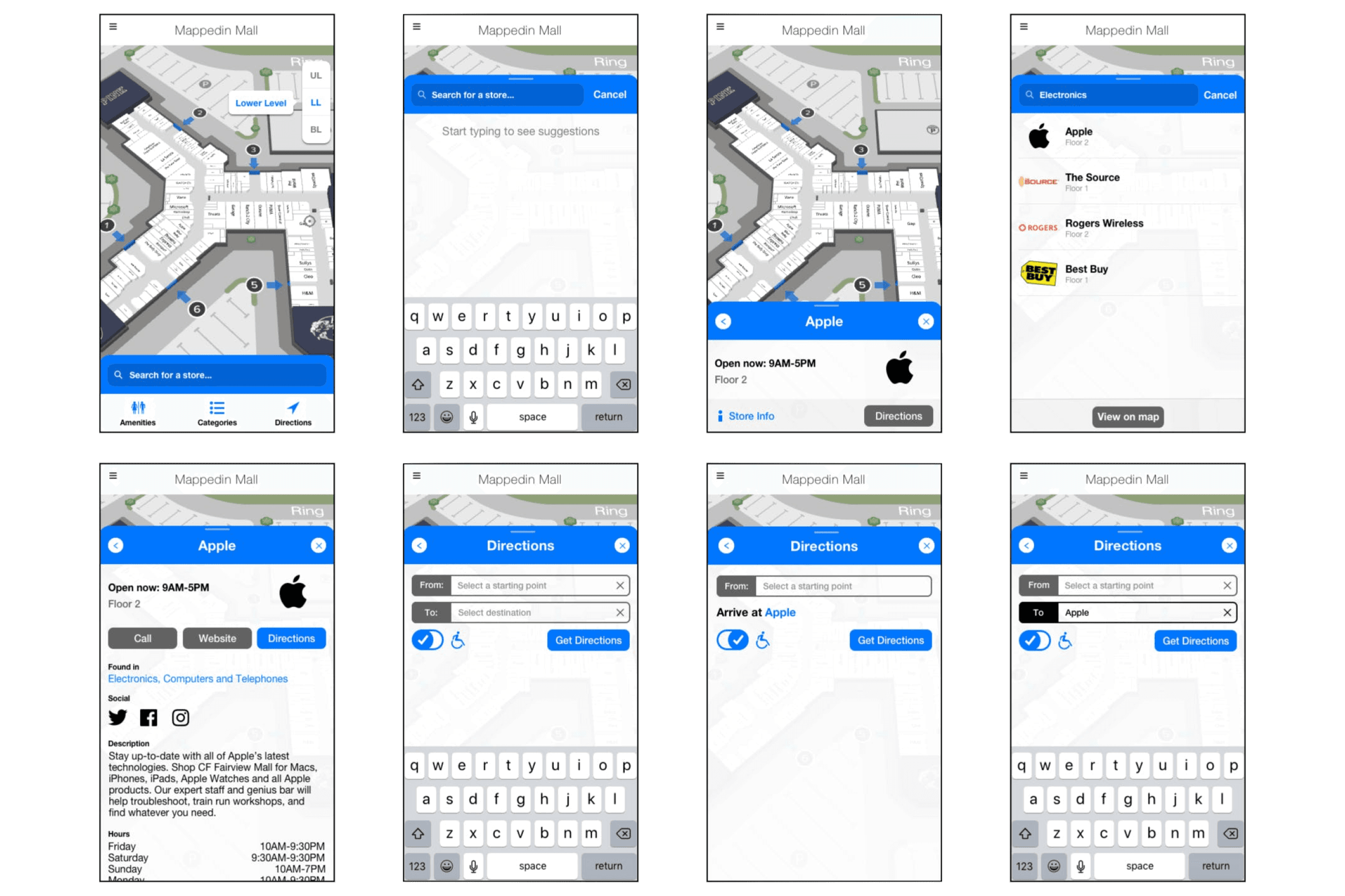
I collaborated with engineering on layout, visual hierarchy, and scalable components. We tested interaction flows, smart map behaviors like auto-rotation, and dynamic labeling. Remote usability testing via usertesting.com helped us validate our assumptions.

Refinement & Release

We released iteratively: first, the core experience (search, directions, map navigation), then layered on features like real-time positioning via Apple’s Indoor Positioning System, and dynamic 2D labels.

Design Process

Discovery & Definition

We gathered feedback from venue operators and reviewed pain points in our existing custom builds. We also benchmarked common patterns in consumer-facing navigation products to understand user expectations.

Exploration & Ideation

We defined key user journeys; planning ahead vs. navigating in-venue, and structured the product around both. Internally, we rallied around a map-first approach: a balance of UI and context using the map.

Design & Prototyping

I collaborated with engineering on layout, visual hierarchy, and scalable components. We tested interaction flows, smart map behaviors like auto-rotation, and dynamic labeling. Remote usability testing via usertesting.com helped us validate our assumptions.

Refinement & Release

We released iteratively: first, the core experience (search, directions, map navigation), then layered on features like real-time positioning via Apple’s Indoor Positioning System, and dynamic 2D labels.

Challenges

We had to keep the interface minimal, context-aware, and responsive. The interface had to serve multiple stakeholders: end-users needed intuitive navigation, while customers wanted branding and analytics.

We had no control over how much space Mappedin Web would be given on customer sites. In some cases, users struggled to use the map when the embed area was too small.

We had no control over how much space Mappedin Web would be given on customer sites. In some cases, users struggled to use the map when the embed area was too small.

Users expected features they were familiar with from outdoor mapping apps, such as a blue dot for real-time positioning and automatic orientation. Without them, the product felt incomplete.

Users expected features they were familiar with from outdoor mapping apps, such as a blue dot for real-time positioning and automatic orientation. Without them, the product felt incomplete.

Maintaining clarity on small screens was difficult. We had to balance label density, touch targets, and contextual UI without overwhelming the user.

Maintaining clarity on small screens was difficult. We had to balance label density, touch targets, and contextual UI without overwhelming the user.

Accessibility was a must. We aimed to meet WCAG 2.1 A–AA standards with screen reader support, readable directions, and a clear tab order—all while keeping the UI clean.

Accessibility was a must. We aimed to meet WCAG 2.1 A–AA standards with screen reader support, readable directions, and a clear tab order—all while keeping the UI clean.

Solutions

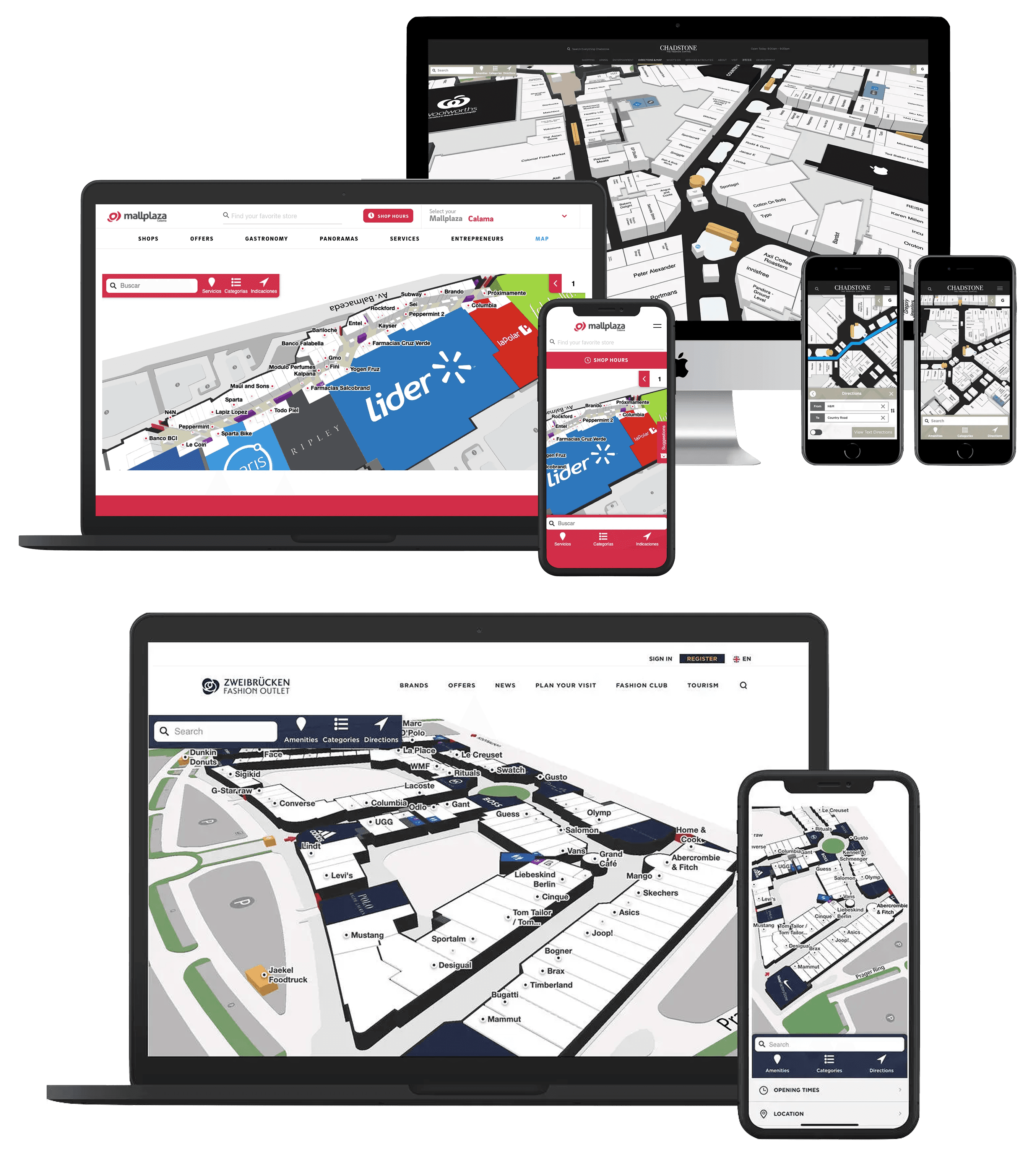
We built Mappedin Web to serve both end-users and venue operators. Simple to use, easy to embed, and flexible enough to integrate with our customer’s branding.
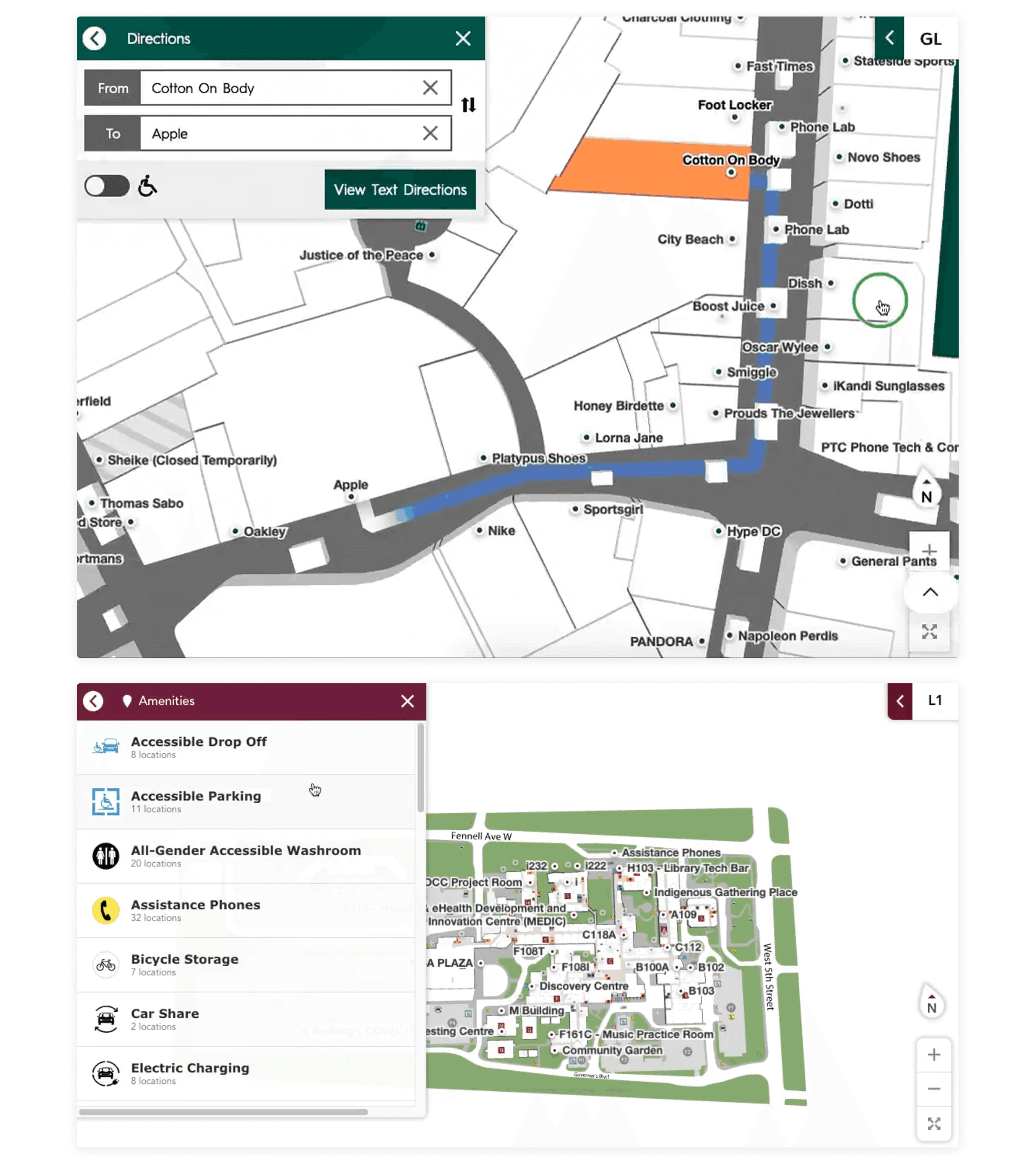
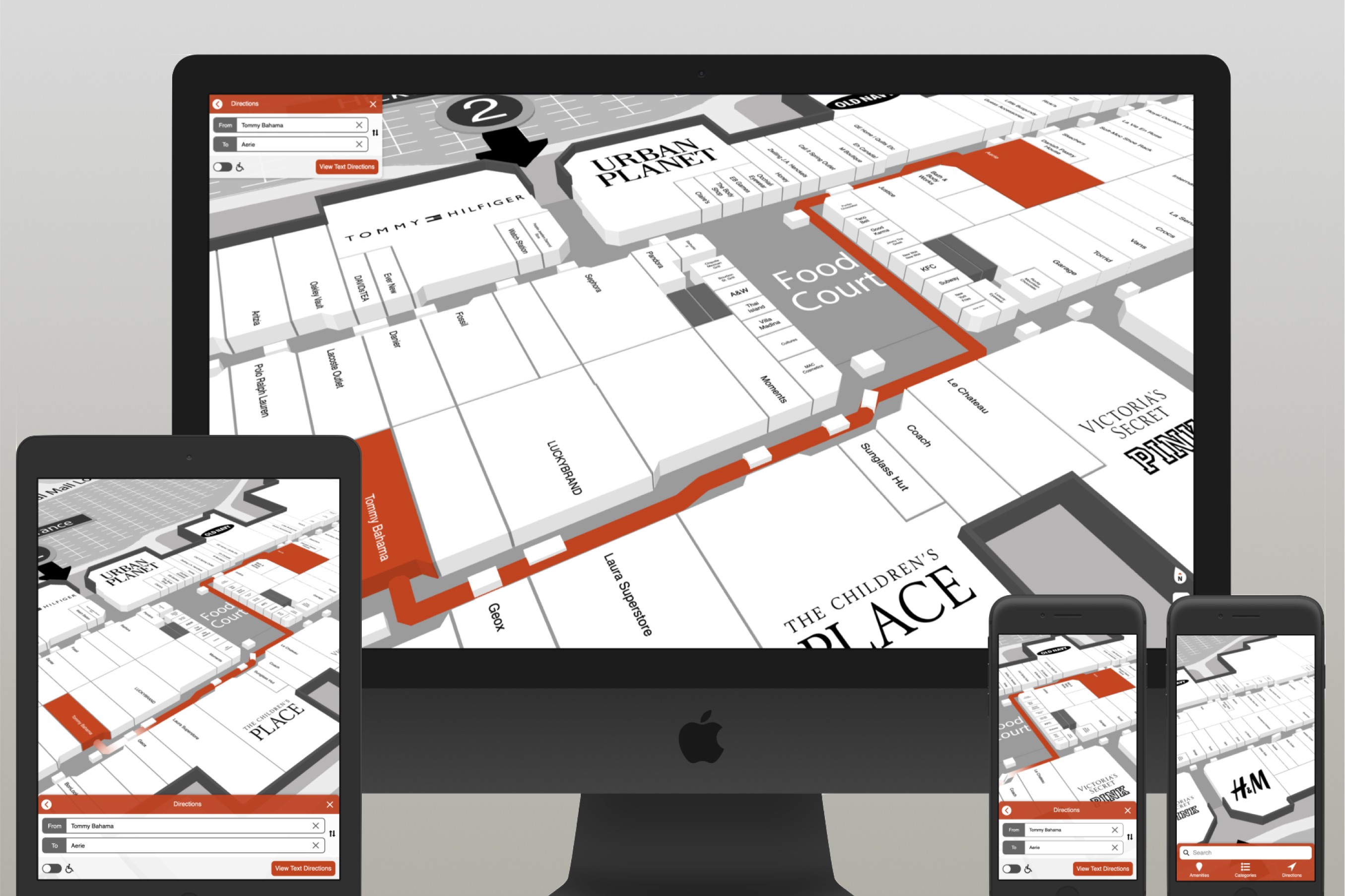
We designed the entire interface around the map. Search, directions, and browsing were done in tandem with the map context. We kept the UI minimal and responsive, ensuring users could always see where they were and where they were going, regardless of screen size.

Special attention was given for navigation across floors or to other buildings, so that we could support a wide range of venues.

We designed the entire interface around the map. Search, directions, and browsing were done in tandem with the map context. We kept the UI minimal and responsive, ensuring users could always see where they were and where they were going, regardless of screen size.

Special attention was given for navigation across floors or to other buildings, so that we could support a wide range of venues.

We prioritized real-time location tracking and partnered with Apple to integrate their Indoor Positioning System for improved accuracy on iOS. This included auto-orientation, persistent “Locate Me” buttons, and seamless transitions between floors. The result: a 2x increase in directions and 42% more location selections.

We prioritized real-time location tracking and partnered with Apple to integrate their Indoor Positioning System for improved accuracy on iOS. This included auto-orientation, persistent “Locate Me” buttons, and seamless transitions between floors. The result: a 2x increase in directions and 42% more location selections.

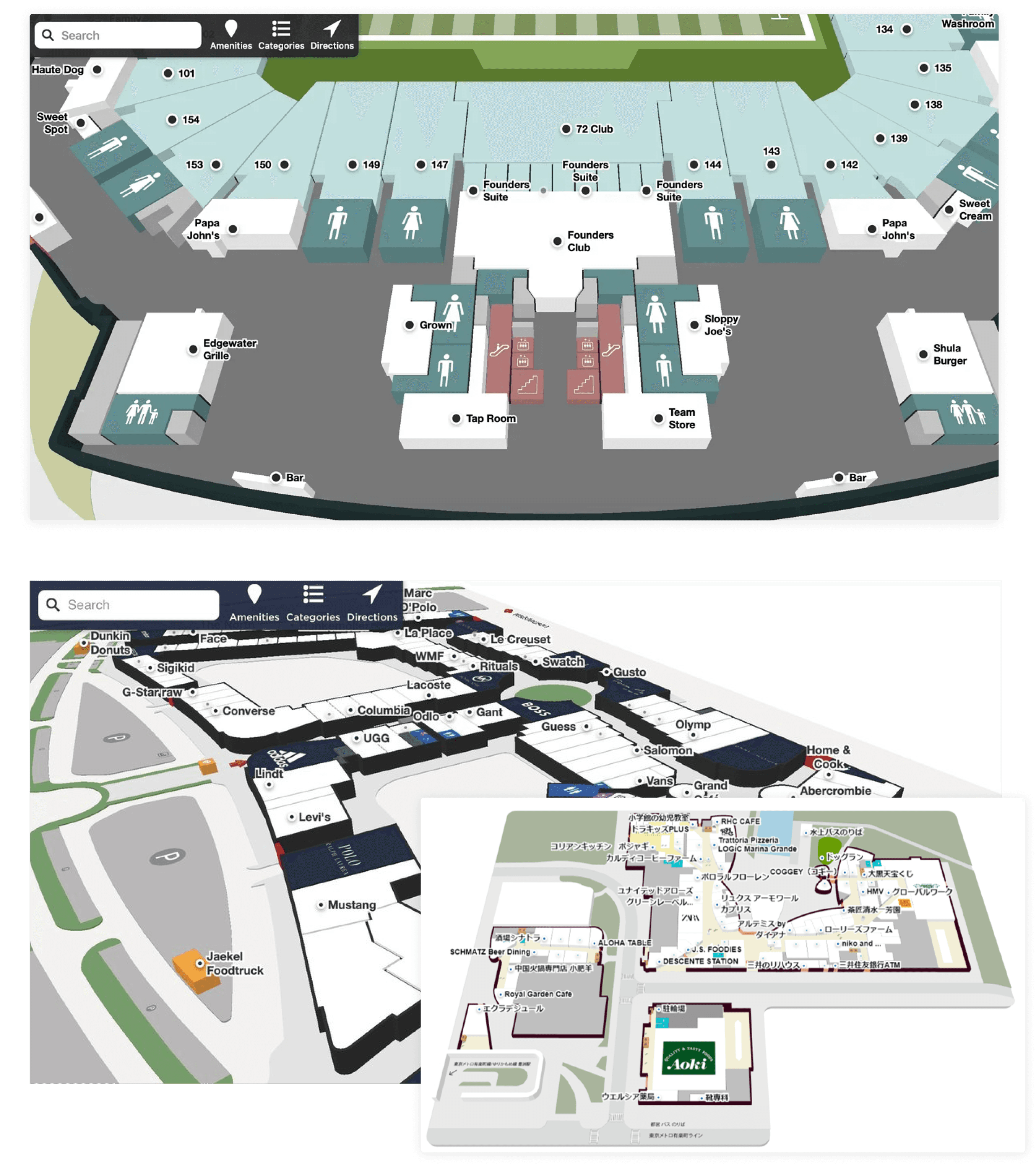
We added an alternative to our 3D-only labels with a smart 2D system that adjusted dynamically to screen size and zoom level. This greatly improved legibility and helped users quickly identify nearby stores or amenities while navigating the map.

We added an alternative to our 3D-only labels with a smart 2D system that adjusted dynamically to screen size and zoom level. This greatly improved legibility and helped users quickly identify nearby stores or amenities while navigating the map.

We introduced a component-based design system that allowed full theming through our CMS. Customers could apply their brand colors, typography, and logos while preserving the structure and usability of the product. All while keeping the interface WCAG compliant. 

We introduced a component-based design system that allowed full theming through our CMS. Customers could apply their brand colors, typography, and logos while preserving the structure and usability of the product. All while keeping the interface WCAG compliant. 

We built a lightweight integration system via a single script tag and published best practices to help customers allocate enough screen space. We provided configuration options and guidance to keep the interface clean and map-focused.

We built a lightweight integration system via a single script tag and published best practices to help customers allocate enough screen space. We provided configuration options and guidance to keep the interface clean and map-focused.

Final Notes

Mappedin Web became one of the company’s most successful products, with over 75% of directory customers adopting it in the first year. As product designer I helped define the strategy, shape the interface, and guide technical decisions that made real-time indoor navigation feel intuitive and accessible. The results were clear: higher engagement, new revenue from blue dot positioning, and a better experience for people trying to find their way indoors.

Later, I transitioned into a Product Management role, where I collaborated with a new product designer to refresh the UI and continue refining the experience. I also helped launch features such as find your seat, seat views, save your parking spot, and multi-destination navigation.

Building digital things since 09'

© 2025

Building digital things since 09'

© 2025